
Custom Cleaning Brush
Rotary Sieve Brush
Rotary sieve brush keeps ceramic glaze & slip screen mesh clear during continuous screening. Custom nylon PA roller, 100–1000 mm width, idler or driven.
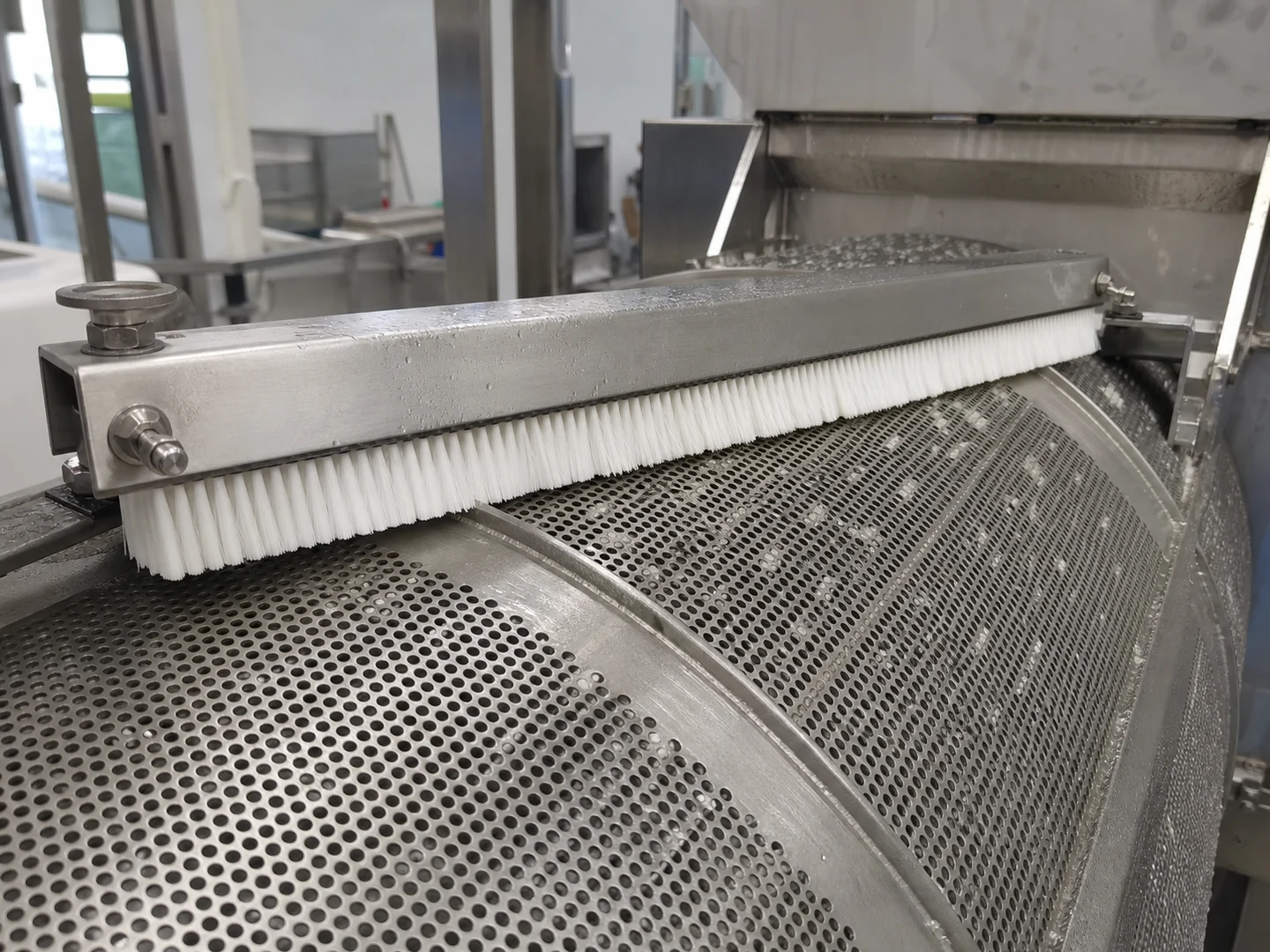
Large-format brush
100 pcs
Minimum order
Built one at a time on a core or channel: full-width rollers, sweeper brooms and long strip.
Production lead time, once the specification is confirmed
- Up to 100 pcsWithin 20 days
- 101–1,000 pcsWithin 30 days
- Over 1,000 pcsConfirmed with your quotation
Peak season can extend these times; the shipping date is confirmed in writing with your quotation. Sampling and shipping are quoted separately.
A rotary sieve brush is a cylindrical roller brush that continuously sweeps the screen surface of ceramic glaze and slip sieves, dislodging lumps and agglomerates from mesh openings and keeping glaze screening lines running without manual scraping. The nylon PA filament roller mounts parallel to the rotary screen and is configurable in working width, diameter, contact force, and drive style to match the sieve.
What can this brush do for you?
Keeps Glaze and Slip Moving Through the Mesh
During continuous screening, fine glaze and slip agglomerates collect in the mesh openings and blind the screen. The rotary brush wipes these particles away on every revolution, returning the openings to full flow and restoring throughput without stopping the line.
Covers the Full Screen Width Without Dead Zones
The brush working length includes a 5–15 mm edge overlap on each side, so the entire screening surface receives contact. On wide rotary sieves, multiple brush sections or a one-piece roller can be built to the correct span, eliminating the edge buildup that creates uneven screening.
Idler or Driven Rotation Fits the Existing Screening Motion
The brush can be mounted as an idler roller that turns with the screen movement, or as a driven shaft with its own speed control. The driven option lets the brush rotate counter to the sieve direction for more aggressive clearing, or co-rotating for gentler contact on fine mesh.
Contact Depth Is Set to Clear, Not Cut the Mesh
Radial engagement of 2–10 mm compresses the nylon filaments just enough to push retained particles without overloading the mesh. Combined with the selected free trim length, this keeps the brush effective while limiting filament wear and screen damage.
Nylon PA Filaments Survive Wet Slurry and Mineral Loads
The PA filament absorbs and releases water without losing stiffness, resists the abrasion of frit and mineral-filled glazes, and springs back after repeated deflection. Hubs and end discs in PP keep the assembly light, corrosion-free, and easy to handle in wet screening areas.
Less Manual Scraping and Screen Downtime
A rotary sieve left unbrushed needs operators to stop the screen, scrape the mesh, and restart the process. A correctly set rotary brush runs with the sieve, so the line keeps screening while the mesh stays open.
What is a Rotary Sieve Brush?
A Rotary Sieve Brush is a cylindrical roller assembly with nylon PA filaments radiating from a moisture-stable polypropylene core or end discs. It is mounted parallel to the screening surface of a rotary sieve on the side where retained material accumulates. As the screen and brush rotate, the filament tips sweep across the mesh, pushing glaze or slip lumps and agglomerates back into flow or toward the oversize discharge.
This is a process brush for continuous wet screening, not an offline scrubbing tool for dried glaze deposits. It prevents mesh blinding rather than removing baked-on material. The correct configuration depends on the screen diameter and curvature, working width, mesh opening, rotation speed, residue hardness, and slurry chemistry.
Technical Specifications
The values below are working ranges; exact dimensions and materials are set to the sieve geometry and slurry conditions for each project.
| Parameter | Specification / Options |
|---|---|
| Screen working width | 100–1000 mm, matched to the rotary sieve deck or drum width |
| Brush outside diameter | 80–600 mm, selected from screen curvature and mounting clearance |
| Free trim length | 25–200 mm, balanced with filament stiffness and contact pressure |
| Filament diameter | 0.30–2.00 mm; smaller for fine agglomerates, larger for coarse lumps |
| Installed radial engagement | 2–10 mm into the screen contact plane, typically 5–25% of free trim |
| Edge overlap | 5–15 mm per side beyond the working screen width |
| Fill material | Nylon PA, grade selected for slurry chemistry and wet abrasion |
| Core / hub | Polypropylene or other moisture-stable polymer; stainless steel shaft options |
| Mounting | Fixed rail, driven shaft, idler roller, or screen-specific bracket |
| Rotation style | Idler following screen motion or externally driven, co-rotating or counter-rotating |
| Operating environment | Continuous wet glaze/slip screening; ambient to mild process temperatures |
| Brush type | Custom Roller and Conveyor Brushes |
| How it is driven | Machine-driven, mounted in the equipment |
| Cleaning target | ceramic glaze preparation line, continuous rotary screener, and glaze recycling circuit cleaning |
| Surface or part | screens, roller, ceramic, edges, and plates |
| Residue or debris | glaze, slurry, particles, and pigment |
| Mounting / connection | Fixed rail, driven shaft, idler roller, or screen-specific bracket; Idler following screen motion or externally driven, co-rotating or counter-rotating |
Where does this brush work best?
- Ceramic glaze preparation lines where rotary sieves screen glaze, engobe, or slip before spray booths, dipping stations, or bucket lines.
- Continuous rotary screeners for frit and pigment slurries, where mineral particles lodge in the mesh and reduce screened output.
- Glaze recycling circuits that remove lumps and dried glaze fragments from returned slurry before reuse.
- Wide rotary screens where manual scraping is difficult or unsafe due to height and constant rotation.
- High-volume plants that need uninterrupted screening without dedicated operators at every sieve.
How do I choose the right one?
Start with the screen geometry and the way the sieve operates, then tune the brush contact to the residue.
- Measure the working span and available clearance. The brush working length must cover the screen width plus 5–15 mm edge overlap per side without binding on side plates, drive collars, or dam rings. Check the distance from the screen surface to the nearest fixed structure; that clearance defines the maximum brush outside diameter.
- Decide between an idler and a driven brush. An idler roller needs no motor and follows the screen motion, which is often enough for soft, fresh agglomerates. A driven shaft should be selected when fine mesh blinds quickly, when residue is heavier, or when the brush needs to counter-rotate for active clearing.
- Match filament diameter and free trim length to the residue. For fine, soft glaze lumps, choose a smaller filament diameter (0.30–0.8 mm) and longer trim. For coarse particles or hard agglomerates, use heavier filament (0.9–2.0 mm) and shorter trim so the tips stay upright and transmit more force to the mesh.
- Set radial engagement to the minimum that clears the mesh. Start around 5–10% of free trim or 2–3 mm radial engagement, then increase only if screened output drops or mesh openings remain blinded. Over-engagement bends filaments permanently, adds motor load, and wears the screen faster.
- Verify slurry compatibility. Nylon PA is suitable for water-based glaze and slip, but strong alkalis, acids, or elevated process temperatures can soften or embrittle the filament. Provide the full slurry chemistry and temperature range so the right PA grade or alternative material can be selected.
| Screening condition | Recommended brush setup |
|---|---|
| Fine glaze, soft agglomerates | Smaller filament diameter, longer trim, low engagement, idler or co-rotation |
| Coarse lumps, frit particles | Larger filament diameter, shorter trim, higher engagement within range |
| Fine-mesh or delicate screen | Softer filament, low engagement, co-rotation or idler; inspect mesh weekly |
| High-speed continuous sieve | Driven counter-rotation, staged engagement increase, frequent filament inspection |
Rotary sieve brushes are not a substitute for offline washing. If deposits have dried and hardened on the mesh, use a pressure wash or chemical cleaning cycle first. If the screen is flat or driven with linear vibration, a fixed strip brush or reciprocating brush is usually a better fit. If the slurry contains sharp, highly abrasive grit that rapidly cuts nylon filament, consider a harder PA grade, abrasive-resistant filament, or shorter brush service intervals.
Can I customize this brush?
We build rotary sieve brushes around the actual screen, not the other way around. To specify a brush, provide the screen working width, drum or deck diameter, mesh opening, rotation direction and speed, available mounting points, residue description, and slurry chemistry. A drawing, photo, or sample of the current screen and bracket assembly speeds up the design.
- Working length and edge overlap matched to the screen span; multi-section builds for wide screens
- Brush outside diameter and free trim length for contact balance
- Filament: diameter, PA grade, stiffness, trim profile, straight or spiral pattern
- Core and end discs: PP, moisture-stable polymers, metal shaft ends with keyways, stub shafts, or bearing mounts
- Mounting: fixed rail clamps, adjustable bearing plates, driven shaft coupling, idler roller, or custom screen bracket
- Rotation: co-rotating or counter-rotating drive configuration and speed ratio
- Color and marking for line identification; packaging as bulk or individually protected to preserve filament shape during shipping
- Project documentation: material declarations, inspection reports, dimensional checks, and third-party testing assistance when your project requires them
What has to be checked before and after a rotary sieve brush is used?
How do I know if the brush is actually clearing the mesh?
Observe screened output stability and inspect the mesh after one shift. If particles sit in openings or throughput drops, increase engagement or switch from idler to driven counter-rotation. Use a light behind the mesh to check for blocked openings.
Should the brush rotate with or against the rotary sieve?
An idler follows screen motion. A driven brush can be co-rotating for gentle contact and longer filament life, or counter-rotating for stronger clearing. Counter-rotation removes fine blinding faster but increases mesh wear; use it only when co-rotation does not keep the mesh open.
What causes the brush to leave edge buildup even with overlap?
If the brush stops short, is misaligned, or the filament ends are bent, the overlap is not contacting the screen. Check mounting parallelism and rotate the brush end-for-end or replace damaged segments. Edge overlap should be measured with the brush under actual engagement, not unloaded.
How often should the brush be inspected on a glaze line?
Weekly inspection under normal use is a starting point. Look for flattened or broken filaments, core wear, bearing play, and buildup of dried glaze between rows. With abrasive frit or high screen speed, inspect daily and keep spare brushes ready.
Can the same brush run on both glaze and slip?
It can, but if the two materials have different colors or additive chemistry, carryover in the brush or housing can contaminate the next batch. Rinse the brush between changes or use dedicated brushes per product line when color purity is critical.
What does brushing not take care of?
Brushing prevents fresh blinding but does not remove hardened, dried deposits already attached to the screen, and it does not replace periodic screen washing, mesh inspection, or replacement. If mesh tension is lost or openings are deformed, restore the screen first.
Guides that go deeper on this
Custom Manufacturing RFQ
Describe Your Application
To quote this brush accurately, send the size, material, cleaning target, residue, quantity, and any available drawing or sample photo.
Drawing or photo optional — it speeds things up, it does not gate the enquiry.
Custom Brush RFQ
Send Your Brush Project
Upload a drawing, product photo, or sample photo and provide the core dimensions and cleaning conditions.
“We need a brush to remove wet residue from a stainless steel conveyor, about 800mm wide. The current brush wears quickly. We can send photos.”
“We sell drinkware and need a cleaning brush to include with the product. Quantity around 5,000 pieces.”