
Custom Cleaning Brush
Microfiber Screen Cleaning Brush
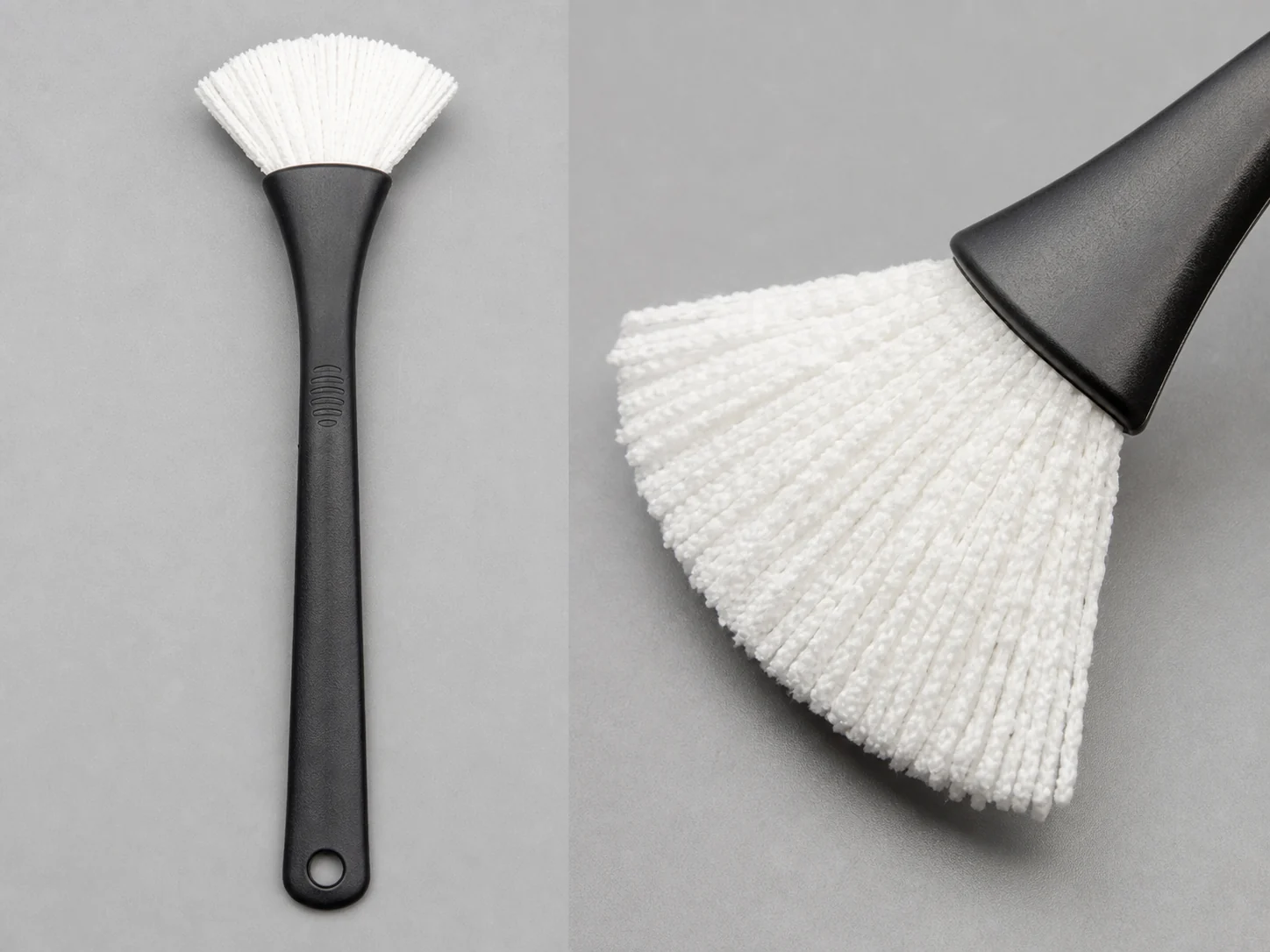
Fan-shaped microfiber brush for dry dust removal from screens, optical surfaces, and instrument panels.
Small brush
500 pcs
Minimum order
Held in one hand: tube, bottle, detail and swab brushes — including long-handled ones with a small head.
Production lead time, once the specification is confirmed
- Up to 500 pcsWithin 7 days
- 501–50,000 pcsWithin 14 days
- Over 50,000 pcsWithin 21 days
Peak season can extend these times; the shipping date is confirmed in writing with your quotation. Sampling and shipping are quoted separately.
A fan-shaped microfiber brush for dry dust removal from screens, optical surfaces, and finished instrument panels. The soft split-fiber contact lifts dust and lint without scratching, and the ABS handle keeps the tool light and easy to control at the workstation.
What can this brush do for you?
Split-fiber contact traps dust instead of pushing it along the glass
Each microfiber filament is split into many fine ends that catch and hold dust, lint, powder, and loose fiber particles. A single light pass removes the visible particle load, instead of shoving it into the screen edge or leaving a dusty haze that settles back after inspection.
Fan-shaped head spreads contact over the flat screen area
The standard fan profile presents a broad working edge that follows the display surface, so fewer strokes are needed to clear small and medium panels. Corner areas along the bezel are reached without turning the brush on edge or applying extra pressure.
The contact side is fiber only
No exposed metal, staple, or hard plastic reaches the surface. If the brush accidentally touches coated glass, a touch panel, or a painted housing during dusting, the contact remains soft and non-marking.
Low-lint construction leaves no second cleaning step
The microfiber blend is selected to hold together under repeated dry strokes, so the brush does not shed visible fibers onto the screen. After dusting, the surface stays ready for visual inspection without a follow-up lint-removal pass.
One-handed handling with a stable fixed head
The 22 mm grip and fixed head-to-handle connection give the operator steady control with light finger pressure. No wobble at the head means the same stroke used to clean a display can be repeated consistently on a production line.
What is a Microfiber Screen Cleaning Brush?
A Microfiber Screen Cleaning Brush is a hand-guided dry dusting tool in which a fan-shaped tuft of ultra-fine microfiber filaments is fixed into a molded ABS handle. It is used to remove loose, dry contamination — dust, lint, fibers, and powder — from surfaces that cannot be touched with stiff bristles, paper wipes, or metal tools.
During use, the operator draws the fan head across the screen or panel in light, single-direction sweeps. The split fibers pick up particles through their large contact area and mechanical grip, while the handle stays firmly in the palm. The brush does not apply liquid and is not designed to scrub films or deposits; its job is the dry residue that settles on clean surfaces before assembly, inspection, or shipment.
The standard configuration measures 30 mm across the fan and 70 mm from the base to the filament tips, with a 120 mm ABS handle. The fixed connection keeps the head stable, and the all-plastic construction avoids introducing metal at the contact point. For high-volume use, the brush is treated as a replaceable hand tool: when the tuft becomes loaded or matted, the unit is swapped rather than repaired.
Technical Specifications
The table lists the standard fan-shaped configuration. Dimensions, filament grade, and handle details can be adjusted to match the screen format or workstation requirement.
| Parameter | Standard Value / Options |
|---|---|
| Head shape | Fan-shaped, flat sweep profile |
| Head width | 30 mm at the widest point |
| Head length | 70 mm from handle base to filament tips |
| Filament material | Microfiber, polyester/polyamide split-fiber blend |
| Handle / base material | ABS |
| Handle length | 120 mm |
| Grip diameter | 22 mm |
| Overall length | Approx. 190 mm depending on head seating depth |
| Connection | Fixed head-to-handle bond; replaceable option available on request |
| Operating condition | Dry use at room temperature; no solvent immersion |
| Color | Natural white/gray standard; custom color available |
| Brush type | Custom Handheld Detail Brushes |
| How it is driven | Hand-guided |
| Cleaning target | flat-panel display and touchscreen, optical surface and instrument window, and finished plastic and painted housing cleaning |
| Surface or part | screens, panels, instruments, plastic, trays, housings, metal, and glass |
| Residue or debris | dust, fiber, lint, particles, powder, and loose particles |
| Mounting / connection | Fixed head-to-handle bond; replaceable option available on request |
Where does this brush work best?
- Flat-panel displays and touchscreens on control equipment, medical monitors, kiosks, and test instruments where dry dust must be removed without liquid contact.
- Optical surfaces and instrument windows, including lens exteriors, microscope stages, camera body panels, and inspection viewports, where loose particles affect image clarity.
- Finished plastic and painted housings, bezels, nameplates, and control panels that require a soft lint-free dusting step before final inspection or packaging.
- Electronics assembly and rework benches where powder, dust, or fiber debris from handling must be cleared from enclosures and screen areas before function test.
- Laboratory and quality-inspection stations that need a clean, dry, non-metallic hand tool for dusting instruments and sample trays.
How do I choose the right one?
Start with the surface geometry. The fan head needs to cover a useful width of the flat screen without overhanging into connectors or gaps. If the working surface is wider than roughly 80–100 mm, a single 30 mm fan will require many passes; consider a wider fan or a multi-head configuration. For curved screens, dome displays, or deep bezel recesses, a standard flat fan may not follow the contour, and a shaped or angled head should be specified.
Then match the filament to the surface coating. Standard polyester/polyamide microfiber is safe for glass, coated glass, acrylic, and polycarbonate. For anti-reflective or anti-fingerprint coatings, choose the finer, lower-denier filament and validate on a sample panel before full deployment. If the surface has loose or flaking coating, do not use any fiber brush; individual fibers can catch and lift the damaged layer.
Check what is actually on the surface. Loose, dry particles — dust, lint, powder — are what this brush removes. Fingerprints, oil films, adhesive residue, and dried liquid spots will not come off with dry brushing. Those contaminants need a lint-free wipe with an approved cleaning solution first; the brush can be used afterward for re-deposited dust.
Consider static control. Polymer filaments can build a small static charge during dry strokes, which sometimes causes fine dust to re-settle on the screen. If the product is ESD-sensitive or the workstation uses ionization, request a static-dissipative microfiber grade and a dissipative handle option. A standard non-dissipative brush may not be acceptable in that process.
Plan for replacement before the brush becomes a contamination source. With a fixed connection, the tuft is not changed in the field. Set an inspection interval based on stroke count or line cycle: as soon as the tuft looks matted, darkens, or no longer fans out, remove the brush from service. For cleanroom or optical lines, replace on a schedule rather than waiting for visible degradation.
For hard, attached residues, a stiffer nylon or PBT brush is more effective, but it may also be too aggressive for the screen. For narrow slots, connector cavities, or deep gaps, a small round microfiber tube brush or an ESD-safe foam swab provides the reach this fan-shaped head does not have.
Can I customize this brush?
Yes. The standard fan configuration is a starting point; most production orders are adjusted to the screen format and line requirements. To define the right configuration, provide the screen or panel width and thickness, surface coating, type of dust or debris, stroke direction, required filament softness, any ESD or cleanroom constraints, and the expected replacement interval.
- Head geometry — fan angle, width, length, tuft density, flat or angled tip, double-layer profile, or a custom molded shape for curved displays.
- Microfiber specification — filament denier, split ratio, polyester/polyamide blend, color, low-lint grade, or static-dissipative treatment.
- Handle — ABS color, overmolded grip, texture, length, hanging hole, or ESD-safe plastic replacement.
- Connection — keep the standard fixed bond for one-piece use, or switch to a replaceable head for service programs and lower long-run handle costs.
- Marking and packaging — pad printing, laser marking, custom color coding, bulk bags, individual polybags, retail cards, or line-ready trays.
If your project requires material documentation, inspection reports, cleanroom-compatible packaging, or third-party validation for static or particulate performance, we can support those requirements as part of the customization process.
How long does a microfiber screen cleaning brush last, and how is it cleaned between runs?
Can this brush be used with liquids?
No. The brush is intended for dry dust removal. Water, alcohol, or cleaning solvents can clump the microfiber, leave streaks on the screen, and weaken the head-to-handle bond. Liquid cleaning should be done with a lint-free wipe and an approved solution.
How do I know when to replace the brush head?
Inspect the tuft regularly. If the fibers are matted, discolored, or no longer fan out after a light shake, replace the brush. A quick field check is to brush a clean black test panel once and then wipe the panel with a white lint-free wipe; if the wipe picks up visible dust or fibers, the brush is releasing particles and should be taken out of service.
Does this brush attract dust back to the screen through static?
Microfiber is an insulator, so some static build-up is possible during dry use. If static re-attraction is a problem, select a static-dissipative filament grade and, where possible, use an ionizing blower at the workstation. For ESD-sensitive assemblies, verify the finished brush against your plant’s static control requirements.
What surfaces should I not clean with this brush?
Avoid hot surfaces, solvent-wet areas, adhesive residue, and any surface with loose or flaking coating. The fine fibers can catch on peeling film or rough edges and make the damage worse. The brush is also not suitable for heavy scrubbing of uncoated metal or abrasive surfaces.
How should the brush be stored between uses?
Store it in a clean, dry holder with the head covered or facing downward. Do not lay the head on a dirty bench, near oils and solvents, or in a drawer with sharp parts. If the tuft becomes contaminated with grease, do not continue using it on screens; replace the unit.
Does this brush remove fingerprints or smudges?
No. Dry microfiber dusting does not remove oily films, fingerprints, adhesive residue, or dried liquid marks. Those contaminants require a wet or solvent-based cleaning step. The brush handles the dry particle load before or after that step, but not instead of it.
Guides that go deeper on this
Custom Manufacturing RFQ
Describe Your Application
An accurate custom quote starts with the dimensions, working surface, residue, material choice, connection, quantity, and reference files.
Drawing or photo optional — it speeds things up, it does not gate the enquiry.
Custom Brush RFQ
Send Your Brush Project
Upload a drawing, product photo, or sample photo and provide the core dimensions and cleaning conditions.
“We need a brush to remove wet residue from a stainless steel conveyor, about 800mm wide. The current brush wears quickly. We can send photos.”
“We sell drinkware and need a cleaning brush to include with the product. Quantity around 5,000 pieces.”