
Custom Cleaning Brush
Antistatic Nylon Electronics Brush
Antistatic nylon electronics brush with a rectangular trim for ESD-safe removal of dust, lint and light flux residue from PCBs, connectors and optics.
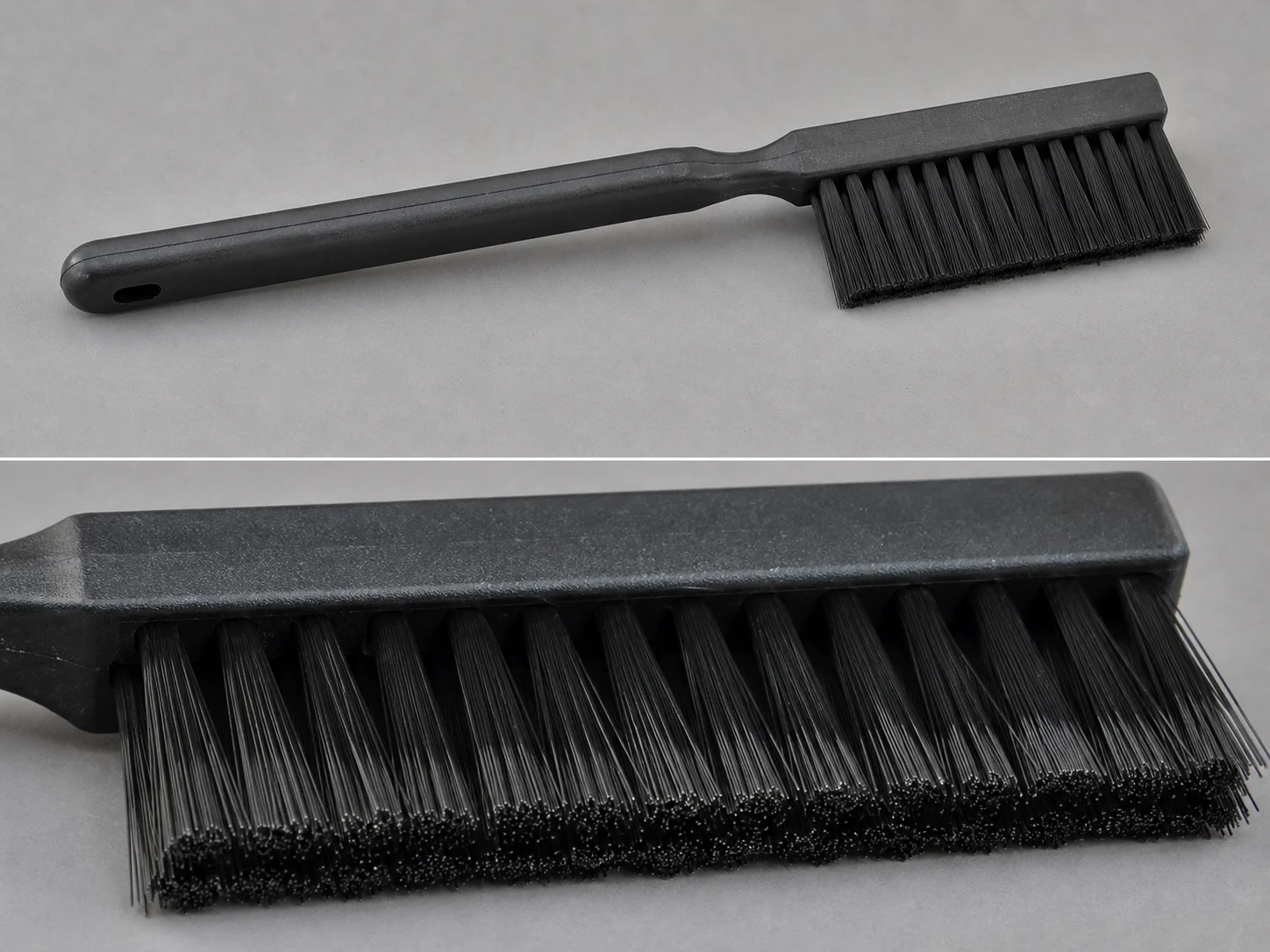
Small brush
500 pcs
Minimum order
Held in one hand: tube, bottle, detail and swab brushes — including long-handled ones with a small head.
Production lead time, once the specification is confirmed
- Up to 500 pcsWithin 7 days
- 501–50,000 pcsWithin 14 days
- Over 50,000 pcsWithin 21 days
Peak season can extend these times; the shipping date is confirmed in writing with your quotation. Sampling and shipping are quoted separately.
An ESD-conscious hand brush with anti-static nylon filaments for controlled, non-scratch removal of dust, lint, and light process residue from static-sensitive electronics surfaces. The rectangular trim head reaches board edges, card slots, connector rows, and component gaps that round brushes cannot contact evenly.
What can this brush do for you?
Dissipates charge instead of building it
The anti-static nylon filament is compounded to prevent triboelectric charge accumulation during brushing. Dusting a PCB, connector, or carrier does not leave a charged surface that re-attracts particles or risks ESD damage to sensitive devices in an ESD-protected area.
Rectangular trim follows flat contact areas
The 20 mm wide by 70 mm long rectangular head lays a flat row of filament tips across board edges, terminal strips, and slot openings. Straight-line strokes remove debris evenly instead of leaving uncleaned center lines that round brushes create on flat surfaces.
Soft filament ends protect sensitive finishes
PA6 filament ends are soft enough for gold-plated pads, solder mask, bare boards, coated housings, and optical end faces. The brush removes loose dust and light residues without the scratching or smearing associated with metal or abrasive tools.
Fixed handle for precise bench control
The short 130 mm polypropylene handle and fixed head leave no play between hand and bristle row, so the operator can place each stroke exactly. The lightweight construction reduces hand fatigue during inspection and rework tasks.
Loose particles release cleanly
Anti-static filament does not hold a static charge that pins dust to the bristle tips. Debris flicks off or can be blown from the head between uses, keeping the brush from re-depositing contamination on the next part.
What is an Antistatic Nylon Electronics Brush?
A hand-guided brush with a fixed rectangular head filled with anti-static nylon (PA6) filaments set in a polypropylene handle. It is used at electronics assembly and rework stations to remove loose dry contamination—dust, lint, fiber particles, and light flux or polishing residue—from parts and surfaces that must not be charged or scratched.
In use, the operator draws the filament tips across the surface with short, controlled strokes. The filaments reach into recessed areas between components, along board edges, and inside card guides without applying enough force to disturb solder joints or optical alignment. The tool is intended for dry or lightly solvent-dampened cleaning, not for soaking or aggressive scrubbing.
Anti-static nylon is a filament grade whose surface resistivity is controlled to the dissipative range, so charge moves away slowly instead of accumulating. This is different from ordinary insulative nylon, which can build static during brushing, and different from conductive filament, which is used where a rapid path to ground is required.
Technical Specifications
Standard dimensions below fit common bench and inspection tasks. Each dimension, filament grade, and handle option can be adjusted for the project.
| Parameter | Standard Value / Options |
|---|---|
| Head shape | Rectangular, flat trim |
| Head width | 20 mm (adjustable) |
| Head length | 70 mm (adjustable) |
| Bristle / filament material | Anti-static nylon PA6 |
| Filament surface resistivity | 10⁶–10⁹ Ω/sq (dissipative range) |
| Filament diameter | 0.10–0.20 mm, selected by stiffness need |
| Handle material | Polypropylene (PP); ESD-safe or other options available |
| Handle length | 130 mm |
| Grip diameter | 18 mm |
| Head-to-handle connection | Fixed (permanent bond); replaceable head available as customization |
| Overall length (approx.) | 190–200 mm with standard handle |
| Operating temperature | -20 °C to 80 °C continuous, dry use |
| Chemical exposure | Compatible with isopropyl alcohol and common flux removers for short wiping contact; avoid prolonged immersion |
| Use mode | Dry dusting preferred; light solvent dampening acceptable |
| Brush type | Custom Handheld Detail Brushes |
| How it is driven | Hand-guided |
| Cleaning target | pcb assembly and inspection bench, connector and card-edge maintenance, and rework and repair station cleaning |
| Surface or part | boards, connectors, slots, edges, gaps, component gaps, guides, and joints |
| Residue or debris | dust, lint, flux, particles, light process residue, flux residue, loose debris, and static-attracted particles |
| Mounting / connection | Fixed (permanent bond); replaceable head available as customization |
The surface resistivity value describes the filament’s ability to prevent static buildup, not the handle or entire brush. For applications that require full tool conductivity or groundable handles, specify this during quoting.
Where does this brush work best?
- PCB assembly and inspection benches: dusting bare boards, populated boards, and solder mask surfaces before soldering, coating, or final inspection.
- Connector and card-edge maintenance: cleaning pins, slots, board guides, and contact areas where flat, narrow access is needed.
- Rework and repair stations: removing loose debris and light flux residue around reworked components without disturbing solder joints.
- Optical and sensor assembly: dusting end faces, lens housings, and carrier surfaces before alignment or packaging.
- Test fixtures, jigs, and carriers: removing static-attracted particles that could transfer to parts during handling.
- Enclosure interiors: dusting chassis surfaces and wire harness areas before closing an assembly.
How do I choose the right one?
Match the head geometry to the surface
Measure the narrowest gap, slot, or recess the brush must enter. The standard rectangular head is 20 mm wide and 70 mm long, suited to board edges and connector rows. If the target area is a deep channel, a round or pointed trim may be needed; if it is a broad panel, a wider head will cover more area per stroke.
Match filament stiffness to the debris
Anti-static PA6 filaments remove loose dust, lint, and light process residue. A finer filament diameter bends more easily and is gentler on gold pads, solder mask, and optical surfaces. A coarser diameter applies more pressure for stubborn light films. Hardened flux, oxidation, solder balls, and baked deposits require chemical cleaning or a different abrasive tool, not this brush.
Check the ESD control requirements
Anti-static filament prevents charge buildup but does not ground the tool. If your process requires a brush with surface resistivity below 10⁶ Ω/sq or a groundable handle, specify conductive-filled filament or an ESD-safe handle material. Plain insulative nylon is the wrong choice for static-sensitive work.
Decide dry or solvent-assisted cleaning
Dry dusting is the default for ESD-safe stations. For light flux residue, the brush can be lightly dampened with isopropyl alcohol or a compatible flux remover. Do not soak the head or immerse the handle, as prolonged solvent exposure can degrade the filament set and handle bond.
When to use a different brush
Use a round or pointed brush for narrow bores, connector interiors, or deep component gaps that the flat rectangular head cannot enter. Use a wider, softer brush for large enclosure panels or display surfaces. Use a conductive brush when the tool must be grounded or must actively remove charge from an insulating surface. This brush is for precision, static-safe dusting—not for heavy mechanical scrubbing.
Can I customize this brush?
This brush can be configured around the actual workstation, board geometry, and ESD control plan. Provide the target surface, contact area dimensions, residue type, surface resistivity requirement, cleaning solvent, handle preference, and any drawing or sample available.
- Head geometry: width, length, trim profile (flat, angled, pointed, round), and overall shape
- Filament: diameter, stiffness, anti-static grade, color, or custom PA blend
- Handle: length, grip diameter, ergonomic shape, hanging hole, ESD-safe or anti-static material
- Connection: fixed permanent bond or replaceable head system
- Marking: pad print, laser marking, molded logo, or color coding
- Packaging: bulk, individual poly bag, ESD-safe pouch, or project-specific packing
If your project requires material declarations, third-party test data, inspection support, or documentation for an internal ESD control program, we can assist with those requirements during the customization process.
Which filament survives the cleaning chemicals an antistatic nylon electronics brush meets?
How can I test whether the brush is still antistatic?
Use a surface resistance meter with parallel electrodes placed across the filament row and compare the reading against the specified dissipative range. If the reading drifts above the range or becomes unstable after heavy solvent use, replace the brush. Note that wear and contamination can affect the measurement, so clean the filament tips before testing.
Should I use this brush dry or with isopropyl alcohol?
Dry use is preferred for dust and lint removal in ESD-controlled areas. For light flux residue, dampen only the filament tips with isopropyl alcohol or a compatible flux remover and allow the head to dry before the next use. Do not soak the head or let solvent wick into the handle joint.
Can this brush be used on energized equipment?
No. This is a hand tool for powered-down cleaning. Anti-static filament prevents charge buildup but does not make the brush safe for live circuits. Always disconnect power and discharge stored energy before cleaning electrical or electronic equipment.
What should I do if I see bristle loss on the board?
Stop using the brush immediately. Inspect the head for cracked filaments, loose ferrule material, or adhesive breakdown. Any brush showing filament loss should be replaced and the board cleaned with an inspection-grade method before further processing. Dedicate brushes per workstation to limit cross-contamination.
How do I clean the brush between uses?
Flick or gently blow the head to remove loose debris, then wipe the filament tips with a clean, lint-free cloth lightly moistened with isopropyl alcohol. Store the brush head-up in a covered holder away from heavy dust. Avoid high-temperature drying and aggressive solvents that can soften the handle or filament.
What is the difference between anti-static and conductive nylon filament?
Anti-static filament has a surface resistivity in the dissipative range, roughly 10⁶–10⁹ Ω/sq, which allows charge to bleed away gradually. Conductive filament is below 10⁶ Ω/sq and provides a faster path to ground. Choose anti-static to prevent static accumulation during brushing; choose conductive when the brush itself must be grounded or used to discharge an insulating surface.
Guides that go deeper on this
Custom Manufacturing RFQ
Describe Your Application
Send the key measurements, cleaning requirement, residue, material direction, mounting method, quantity, and drawing or photo.
Drawing or photo optional — it speeds things up, it does not gate the enquiry.
Custom Brush RFQ
Send Your Brush Project
Upload a drawing, product photo, or sample photo and provide the core dimensions and cleaning conditions.
“We need a brush to remove wet residue from a stainless steel conveyor, about 800mm wide. The current brush wears quickly. We can send photos.”
“We sell drinkware and need a cleaning brush to include with the product. Quantity around 5,000 pieces.”