
Custom Cleaning Brush
Cleanroom Brush
Cleanroom brush for connectors, contacts, board terminals, optical end faces, and precision housings.
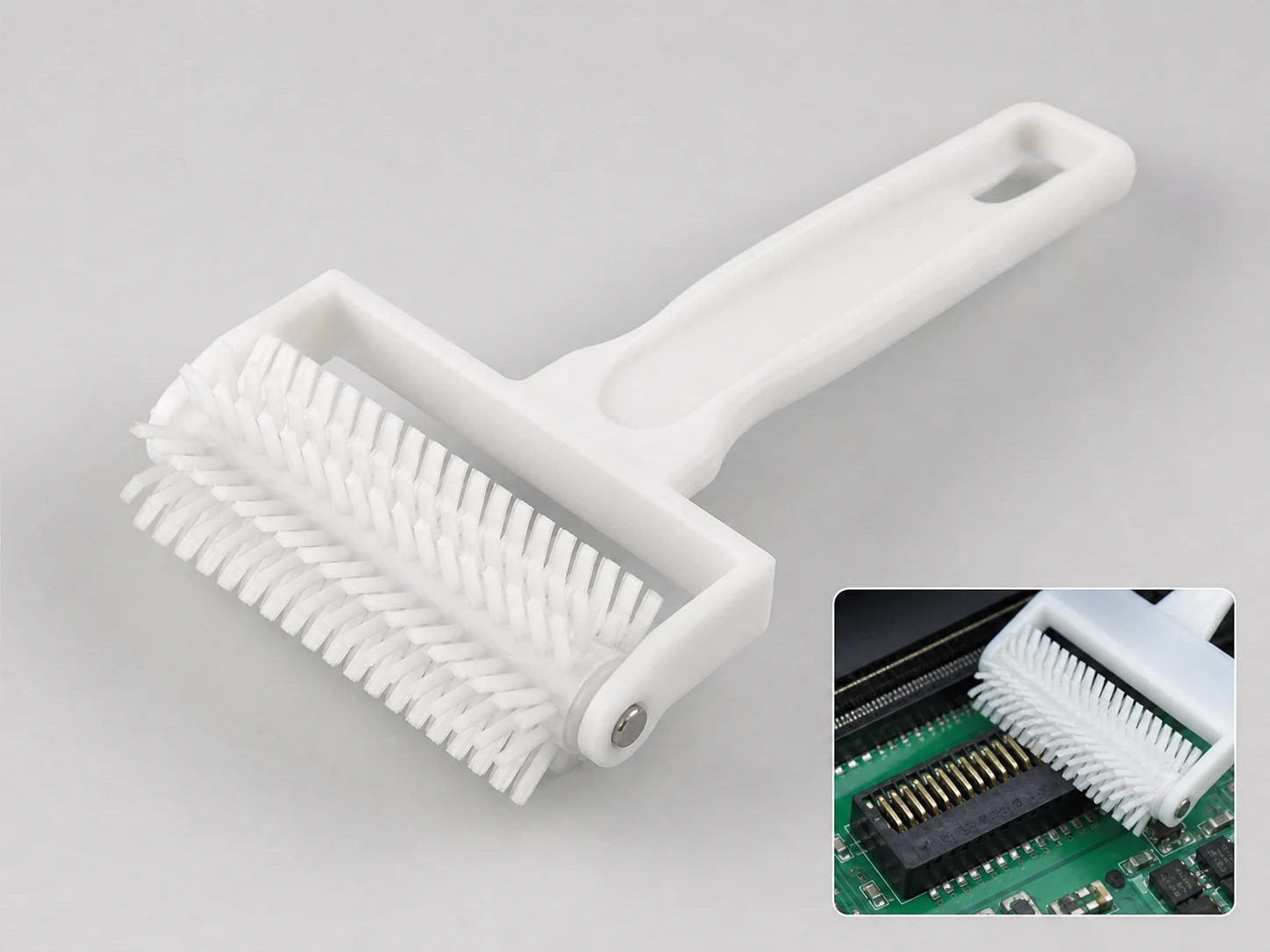
Small brush
500 pcs
Minimum order
Held in one hand: tube, bottle, detail and swab brushes — including long-handled ones with a small head.
Production lead time, once the specification is confirmed
- Up to 500 pcsWithin 7 days
- 501–50,000 pcsWithin 14 days
- Over 50,000 pcsWithin 21 days
Peak season can extend these times; the shipping date is confirmed in writing with your quotation. Sampling and shipping are quoted separately.
A low-shedding precision cleaning tool engineered for static-sensitive electronics, optical, and cleanroom assembly environments. It removes lint, oxide, light flux residue, polishing particles, and static-attracted dust from connectors, contacts, boards, optical end faces, and precision housings without adding the contamination that ordinary brushes introduce.
What can this brush do for you?
Limits the particles a brush normally adds
The working fill uses low-shedding synthetic filaments and sealed bonding instead of natural fiber, exposed adhesives, or open-cell materials that break down during use. That keeps loose filament ends and glue fragments out of connector pockets and off contact surfaces, where they become failures that general-purpose brushes hide.
Provides a defined ESD path for static-sensitive assemblies
When the process requires it, conductive or static-dissipative filament and handle options steer charge away from the part and toward the operator’s grounded path. On CMOS boards, optical modules, and connectors with discharge-sensitive contacts, this is a process control decision as much as a cleaning decision.
Fits the access zone, not just the general area
Head widths from 10 mm to 50 mm and trim lengths from 10 mm to 30 mm can be matched to the connector body, slot depth, pin pitch, or recessed housing. That buys contact where a wider utility brush stops at the opening and leaves the actual failure site untouched.
Handles the wet chemistry of electronics cleaning
PBT filament keeps its shape and stiffness after contact with IPA, deionized water, and common electronics-grade solvents. The brush does not turn sticky, swell, or shed fibers when wetted lightly for flux or particle pickup during rework or inspection.
Does not become a contamination source in the tool itself
Smooth molded handle and holder surfaces leave no crevices for residue to collect in. The brush can be wiped down before and after use, so the cleaning tool stays clean enough for the controlled area where it is used.
What is a Cleanroom Brush?
A Cleanroom Brush is a manually guided cleaning instrument built to remove loose particulate and light contamination from sensitive surfaces in controlled environments. It is not a general-purpose brush repackaged: the filament, bonding, handle, and packaging are selected so the brush itself introduces fewer particles and less static than a standard shop brush.
In use, the operator moves the brush along connector bodies, edge contacts, slot interiors, optical end faces, or housing surfaces with short controlled strokes, dry or lightly wetted with an approved solvent. The working face does the cleaning; the rest of the tool is designed to stay out of the way and out of the contamination budget.
The brush is suited to loose particles, static-attracted dust, light oxide, and light flux or polishing residue. It is not a scrubbing tool for heavy burned flux, thick corrosion, or abrasive removal; those jobs require a solvent-assisted process, swab, ultrasonic bath, or mechanical abrasive in an area designed for that level of contamination.
Technical Specifications
Dimensional values below are standard reference points; most parameters are adjusted to the connector, board, or component geometry you are cleaning.
| Parameter | Standard / Available Range |
|---|---|
| Brush form | Hand/detail, strip, connector-specific, or dedicated tool geometry |
| Filament material | Low-shedding PBT standard; conductive nylon PA or carbon-filled option for static control |
| Trim length | 10–30 mm, selected for slot depth and controlled contact pressure |
| Head / working width | 10–50 mm, matched to the connector body, row pitch, or access opening |
| Overall length | 100–200 mm typical; shortened or extended for operator reach and work-cell clearance |
| Handle / holder | Smooth, wipeable molded polymer; conductive handle option; sealed against fluid ingress |
| Filament retention | Bonded or mechanically anchored without particle-generating adhesives exposed |
| Fluid compatibility | Dry use; compatible with IPA, DI water, and common electronics cleaning solvents |
| Static-control option | Conductive/static-dissipative filament and handle selected when ESD control is required |
| Brush type | Custom Handheld Detail Brushes |
| How it is driven | Hand-guided |
| Cleaning target | board-to-board and backplane connector body, edge-card finger, and optical fiber end face cleaning |
| Surface or part | connectors, housings, optical end faces, precision housings, boards, pins, pads, and slots |
| Residue or debris | particles, dust, static-attracted dust, oxide, flux, fiber, flux residue, and polishing particles |
| Mounting / connection | Shaft-Mounted / Flange |
Cleanroom suitability is a construction choice — filament, bonding, handle material, and packaging — rather than a label. Tell us the cleanroom class, ESD sensitivity, and solvent exposure so the brush is built to the actual process.
Where does this brush work best?
- Board-to-board and backplane connector bodies, where dust and light oxide on contact pads create intermittent opens or high contact resistance.
- Edge-card fingers, terminal blocks, test points, and narrow pin rows that require a controlled-width working face.
- Optical fiber end faces, lens barrels, and ferrule holders during precision assembly or rework, where a stray fiber or particle is a functional defect.
- Wafer carriers, film frames, trays, and precision housings after polishing, machining, or handling, to lift fine particles before inspection or packaging.
- Static-attracted dust on populated and bare PCBs, carriers, and tooling, where a non-ESD brush would hold charge and redeposit the same particles.
How do I choose the right one?
Start with the ESD requirement
If the part is static-sensitive — CMOS boards, optical modules, connectors with discharge-sensitive contacts — choose the conductive or static-dissipative option. For non-ESD areas or parts already discharged, standard PBT fill is usually enough. This decision must be made before geometry, because it affects the filament and handle material.
Match trim length and head width to the actual access space
Measure the opening width, slot depth, pin pitch, and reach. A head that is too wide skips between rows or will not enter at all. A trim that is too long folds over and loses contact; too short leaves residue at the bottom of the slot. The 10–30 mm trim and 10–50 mm head ranges cover most precision connector and optical work, but the exact combination is set to your component drawing.
Match stiffness to what you must remove without what you must not damage
Stiffer, shorter-fill trimming removes more attached dust and light oxide from robust metal contacts. Softer or finer filament ends are appropriate for gold plating, solder mask, coated surfaces, and optical faces where contact marking is unacceptable. Test on a sample or reject part before full-line use if surface appearance is critical.
Decide dry versus solvent-assisted cleaning
Dry strokes remove loose particle and static-attracted dust. Light wetting with IPA or DI water helps release light flux and polishing residue. Confirm the handle-to-filament bond and any conductive treatment are rated for the solvent; some conductive additives can oxidize if repeatedly soaked, so wet use should be specified up front.
When a cleanroom brush is not the right tool
Use a lint-free swab and solvent for tight optical bores where a brush head cannot fully contact. Use ultrasonic or aqueous cleaning for thick flux, solder balls, or residue embedded under components. Use an abrasive or metal brush only outside the cleanroom and never on ESD-sensitive contacts. This brush removes what mechanical brushing can remove without becoming a second source of contamination.
Can I customize this brush?
Most cleanroom brush programs are built around a specific connector, board, or work-cell geometry. Share the component drawing, photos, and a description of the residue and cleaning motion, and we can align the brush to it.
Commonly adjusted parameters:
- Head geometry — width, profile, angle, tapered tip, chisel edge, detail tip for optical end faces, strip form, or dedicated connector shape
- Filament — PBT, conductive nylon PA, carbon-filled material, stiffness, diameter, density, and trim profile
- Handle / holder — length, grip texture, hanging feature, conductive handle, ESD-safe holder, or fixture-mounting interface
- Bonding / construction — adhesive-free retention where required, sealed stem, and no exposed metal in contact zones
- Marking — color coding, pad printing, laser marking, or identification for work-cell ownership
- Packaging — double-bagged cleanroom packaging, anti-static bags, individual wrapping, or bulk packs with clean transfer procedures
If the project requires particle testing, material declarations, outgassing data, or third-party evaluation, we can support those requirements as part of the customization scope.
When is a cleanroom brush worn out rather than just dirty?
How do I check whether a brush is actually cleanroom-compatible before introducing it to the line?
Inspect the filament ends and bond zone under magnification for loose or clipped fibers. Wipe the handle with a cleanroom wipe and check for transfer. Confirm the brush was packaged and transferred in cleanroom-compatible packaging. A brush that drops fibers onto a black inspection mat during a dry stroke test is not acceptable for critical contact areas.
Should I clean the brush before first use?
Yes. Wipe the handle and holder with an approved cleanroom wipe and allow any solvent to flash off before entering the controlled area. Do not rinse the filament with tap water or unapproved solvents; that can leave residue that transfers to the part on the first stroke.
Does brushing replace swab cleaning or an ultrasonic process?
No. Brushing removes loose and lightly attached contamination. Tight bores, under-component residue, and heavy flux still require swabs, solvent immersion, ultrasonic cleaning, or a dedicated cleaning process. Use the brush where mechanical contact helps, and keep the other steps where they belong.
How can I verify the brush is not scratching gold pads or optical surfaces?
Run a controlled test on a known-good scrap part, then inspect the surface under the same magnification used for final inspection. If visible marking or residue transfer appears, reduce trim stiffness, soften the filament, round the filament ends, or switch to a swab. Never introduce a new brush configuration to production parts without a verification run.
How often should the brush be replaced?
Replace when filaments are bent, matted, missing, or no longer spring back after light pressure, or when the handle shows cracks where residue can collect. Track replacement by work cell and part family; a brush that has been in service without inspection is a contamination risk even if it still looks white.
Can a conductive brush be used on live circuits?
No. A conductive or static-dissipative brush is not an insulated tool. De-energize the assembly and confirm voltage is absent before contact. Ground the operator, mat, and work surface according to your ESD control plan before using conductive fill on static-sensitive parts.
Guides that go deeper on this
Custom Manufacturing RFQ
Describe Your Application
Please include the main sizes, application, residue, preferred material, interface, quantity, and any drawing or sample available.
Drawing or photo optional — it speeds things up, it does not gate the enquiry.
Custom Brush RFQ
Send Your Brush Project
Upload a drawing, product photo, or sample photo and provide the core dimensions and cleaning conditions.
“We need a brush to remove wet residue from a stainless steel conveyor, about 800mm wide. The current brush wears quickly. We can send photos.”
“We sell drinkware and need a cleaning brush to include with the product. Quantity around 5,000 pieces.”