
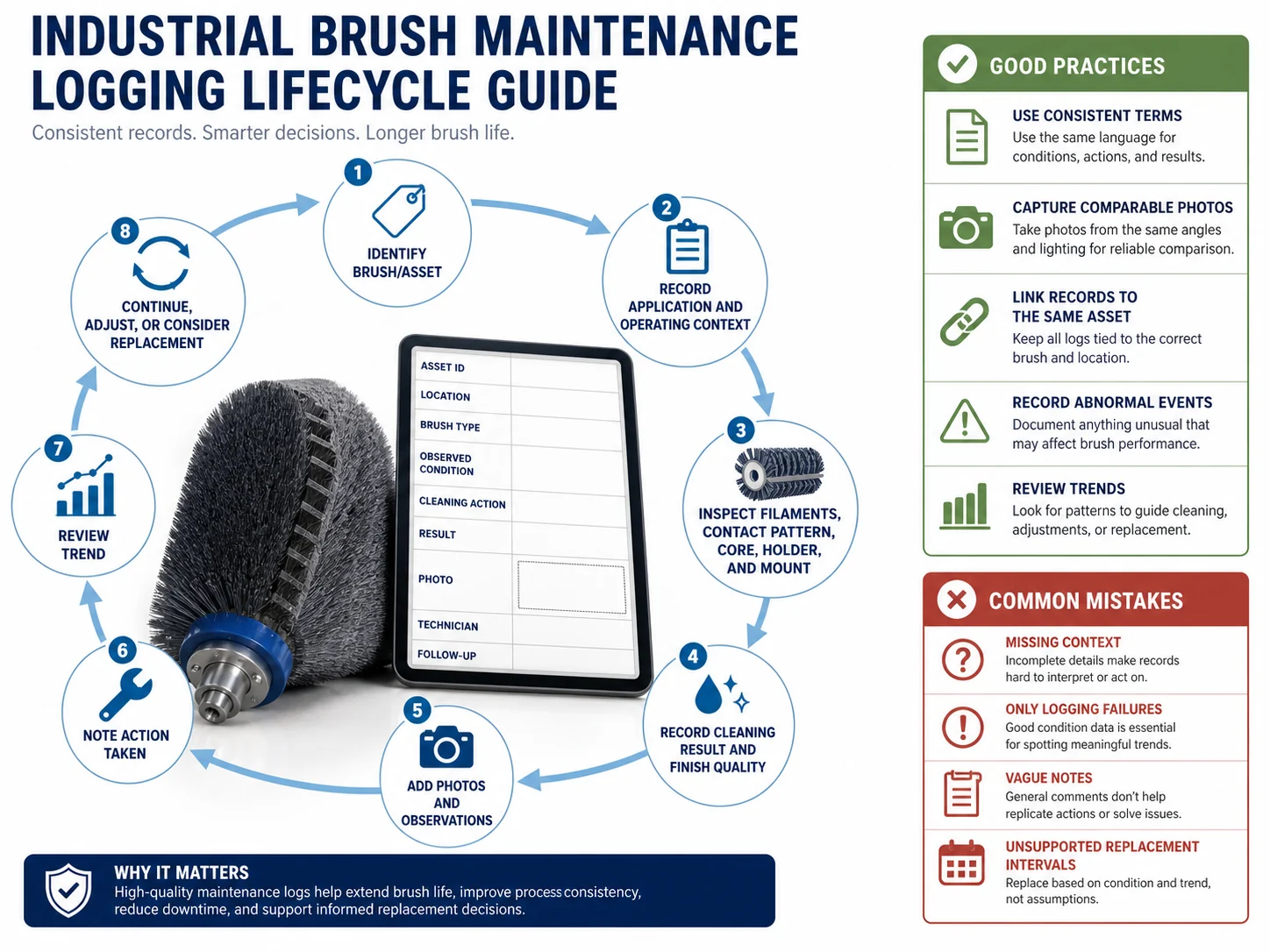
What Is Maintenance Logging for Industrial Brushes?
Maintenance logging for industrial brushes is a structured method of documenting how a brush performs throughout its service life. It captures installation details, operating hours, inspection results, cleaning effectiveness, wear patterns, adjustments, and the reason for replacement. The goal is to turn individual observations into usable history that helps you spot trends, schedule proactive replacements, and reduce unplanned downtime.
Key Metrics to Track in a Brush Maintenance Log
Recording the right data makes the difference between a check‑the‑box exercise and a useful decision tool. The table below lists the core metrics to capture every time a brush is inspected or serviced.
| Metric | What It Tracks | Why It Matters | Example Entry |
|---|---|---|---|
| Installation Date | Date the brush was put into service | Establishes the service time baseline for wear analysis | 2025‑01‑15 |
| Operating Hours / Cycles | Total runtime (hours, strokes, or production cycles) since installation | Main driver of mechanical wear; helps set replacement intervals | 1,200 h |
| Inspection Date | Date of each inspection | Provides a timeline of condition changes | 2025‑06‑01 |
| Cleaning Performance | Qualitative rating (e.g., “like new,” “acceptable,” “poor”) or quantitative measure (e.g., surface finish, residue level) | Flags degradation that may not be visible as physical wear | Acceptable – slight streaking |
| Wear Pattern | Observed wear (even, uneven, bristle loss, deformation) | Uneven wear can point to misalignment, overloading, or incorrect brush selection | Even wear; outer 3 mm bristles shortened |
| Adjustment History | Any adjustments made (pressure, speed, position, cleaning cycles) | Shows how process changes affect brush life | Increased contact pressure 0.5 mm on 2025‑04‑10 |
| Replacement Reason | Why the brush was removed (wear, damage, process change, preventive schedule) | Builds a failure‑mode profile for future brush selection | Bristle length below minimum; replaced preventively |
Using a consistent set of fields makes it possible to compare performance across similar brushes and operating lines.
Simple Brush Maintenance Log Template
You don’t need specialized software to start. A paper log or spreadsheet can capture the essential data. Below is a minimal template that can be printed or copied into a digital tool.
| Field | Value |
|---|---|
| Brush ID / Description | [e.g., Conveyor cleaning brush #4, 300 mm OD, nylon] |
| Location / Machine | [e.g., Line 2 belt cleaner] |
| Installation Date | [YYYY‑MM‑DD] |
| Operating Hours at Last Inspection | [h] |
| Inspection Date | [YYYY‑MM‑DD] |
| Cleaning Performance | [Like new / Acceptable / Poor] |
| Wear Pattern | [Even / Uneven – describe] |
| Adjustments | [Record any changes since last inspection] |
| Notes / Next Steps | [e.g., Monitor, schedule replacement within 100 h] |
For multiple brushes, add columns for each brush or use separate sheets. The key is consistency: fill out the same fields every time.
How Maintenance Logging Supports Preventive Maintenance
Tracking brush performance over time enables pattern‑based decisions, not just reactive fixes. For example:
- Trend line of cleaning performance – if cleaning quality drops predictably after 800 hours, you can schedule replacement at 750 hours to avoid quality rejects.
- Wear rate calculation – by dividing bristle length loss by operating hours, you can estimate remaining life and order replacements in advance.
- Adjustment history review – if frequent pressure adjustments are needed, it may indicate a mismatch between brush and application, prompting a reevaluation of brush type or mounting.
These insights come from simple record‑keeping, not advanced algorithms. The log is a memory aid that helps you act before failure disrupts production.
Common Mistakes in Brush Maintenance Logging
Even well‑intentioned logging can fall short if these pitfalls are ignored:
- Logging only failures or replacements. Waiting until a brush fails misses the opportunity to learn from normal wear and performance degradation.
- Leaving out operating conditions. Ambient temperature, humidity, chemical exposure, and line speed directly affect brush life. Without this context, log entries are hard to compare.
- Skipping performance ratings. A brush may look fine but clean poorly. Subjective ratings like “acceptable” provide an early warning.
- Not recording small adjustments. Minor changes in pressure or position can accumulate and change the wear pattern. Without a record, troubleshooting becomes guesswork.
- Using inconsistent units or vague descriptions. “Some wear” tells you little. Standardize terms (e.g., “bristle length reduced by 2 mm”) so entries are comparable across inspections.
When a Formal Maintenance System (CMMS) Is Needed
A simple log works well for a limited number of brushes in a single line. However, a Computerized Maintenance Management System (CMMS) becomes necessary when:
- You manage dozens of brushes across multiple machines and shifts.
- Work orders, inventory management, or compliance documentation must be integrated.
- Automated alerts for scheduled inspections or low stock are desired.
- Regulatory or quality certification (e.g., the specified cleanroom ISO class) requires traceable records.
If you’re spending more time organizing paper logs than acting on the data, it’s a signal to evaluate a CMMS or at least a shared digital spreadsheet with date‑based reminders.
Final Takeaway
Good maintenance logging turns raw observations into actionable trends. Start with the basic metrics, use a consistent template, include both physical wear and cleaning performance, and involve operators in the data collection. Even a simple log will reduce emergency replacements and improve brush selection over time. If the process grows complex, let the log itself justify the move to a CMMS.
When a Maintenance Log Is the Wrong Choice
This brush is not enough when the main problem is blocked access, unsafe working conditions, damaged equipment, incompatible chemicals, or a process setting that keeps recreating the residue. In those cases, review surface finish, solvent exposure, access angle, scratch tolerance, and soil severity and confirm the surrounding cleaning method before increasing brush stiffness or contact pressure.
Frequently Asked Questions
How often should I inspect brushes for the log?
Frequency depends on wear rate and process criticality. As a starting point, inspect weekly or every 100 operating hours and adjust based on observed wear patterns. High‑use brushes may require daily checks.
What is the difference between a simple log and a CMMS?
A simple log is a standalone record—often paper or a spreadsheet—that tracks one brush or a small group. A CMMS integrates logging with work orders, inventory, scheduling, and reporting across many assets. Simple logs are ideal for limited, stable environments; a CMMS fits larger, more complex operations.
Can I use a digital spreadsheet instead of paper?
Yes. A spreadsheet offers search, graphing, and backup advantages. The same fields apply; just be disciplined about consistent data entry. Some teams use a shared cloud spreadsheet with a form for operator input.
What if I don’t know the exact operating hours?
Use the best available proxy: production cycles, calendar days, or a conservative estimate based on shift logs. Consistency matters more than absolute precision. Note the estimation method in the log.
How do I measure cleaning performance consistently?
Define simple, repeatable criteria: visual rating (like‑new, faint streaking, heavy residue), a go/no‑go test with a test coupon, or a quick surface roughness measurement where relevant. Train all inspectors on the same standard.
Should I log minor adjustments?
Yes. Minor adjustments such as a 0.2 mm pressure change may seem trivial, but over time they affect wear and performance. Recording them helps trace root causes when wear patterns change.
How long should I retain brush log records?
Keep records for the life of the machine or process, plus any internal audit period. For most industrial settings, 3–5 years is a safe minimum. Regulatory or quality systems may require longer retention.
Which nylon grade fits this job — Nylon PA, PA6 Nylon or PA66 Nylon?
| Grade | Continuous temperature (°C) | Peak temperature (°C) | Water absorption | Hardness |
|---|---|---|---|---|
| Nylon PA | 93 | 121 | 0.3–9% by PA grade and conditioning | Medium to firm; filament diameter and trim length control bending force. |
| PA6 Nylon | 80–100 | 130–160 | 1.5–3.0% | Shore D 75–85 |
| PA66 Nylon | 100–120 | 150–180 | 1.0–1.8% | Shore D 80–88 |
| PA610 Nylon | 90–110 | 130–150 | 0.5–1.0% | Shore D 72–82 |
| PA612 Nylon | 90–110 | 130–150 | 0.3–0.7% | Shore D 70–80 |
Figures as published by Brushtec / DuPont. Confirm the exact grade against the supplier datasheet before ordering.
What should replace Nylon PA when it stops working?
- Nylon PA — Compare Nylon PA with PP, PBT, PET. Change material when wet stiffness, temperature, chemical resistance, conductivity, particle shedding, or surface marking becomes the limiting factor.